If you’ve worked with Kafka for more than a week, you’ve run into the word “offset” more times than you can count. It shows up in error messages, in consumer configs, in dashboards — and most explanations either wave their hands at it or bury it in more jargon than it deserves. It’s a simple idea underneath all that: an offset is just a position marker. Once that clicks, most of Kafka’s consumer behavior stops feeling mysterious.
This post walks through what offsets are, why they matter in practice, and how to track them yourself with a small Python consumer.
1. What an offset actually is
Every Kafka topic is split into partitions, and each partition is just an ordered, append-only log of messages. Every message in that log gets a number based on its position — the first message is offset 0, the next is offset 1, and so on. That number never changes once it’s assigned.
There are really two offsets worth knowing about:
- Message offset — the position of a message inside its partition. Fixed, permanent, assigned by Kafka.
- Consumer offset — the position a consumer has reached while reading that partition. This one moves as the consumer works through the log, and Kafka lets the consumer save (“commit”) it, so it can pick up where it left off after a restart.
The message offset is Kafka’s bookkeeping. The consumer offset is yours.
2. Why this matters in production
Offsets exist to solve one problem: what happens when a consumer dies mid-stream?
- Crash recovery. If a consumer crashes, it doesn’t need to guess where it stopped — it resumes from the last committed offset. No manual intervention, no data loss, no duplicate processing (assuming the commit strategy is right, more on that below).
- Replay. Because the log isn’t deleted after it’s read, you can rewind a consumer to an earlier offset and reprocess messages — useful for backfilling a broken analytics job or debugging a production incident after the fact.
- Progress tracking. Offsets are effectively a checkpoint. Anyone can ask “how far behind is this consumer?” by comparing its committed offset to the latest offset in the partition — which, as you’ll see below, is also how you catch a consumer that’s silently falling behind.
3. Two ways offsets get committed
Example 1 — automatic commits, single partition, two consumers in a group
Say a topic has one partition, and a consumer group with two workers, Consumer-A and Consumer-B, is reading from it.
- Messages
m0,m1,m2land in the partition at offsets 0, 1, 2. - Consumer-A reads
m0, commits offset 0. Readsm1, commits offset 1. - Consumer-A crashes right after committing offset 1. On restart, it resumes at offset 2 — it re-reads nothing and skips nothing.
This is the easy case, and it’s why auto-commit is fine for a lot of workloads: fast, low-friction, no message loss as long as commits keep pace with processing.
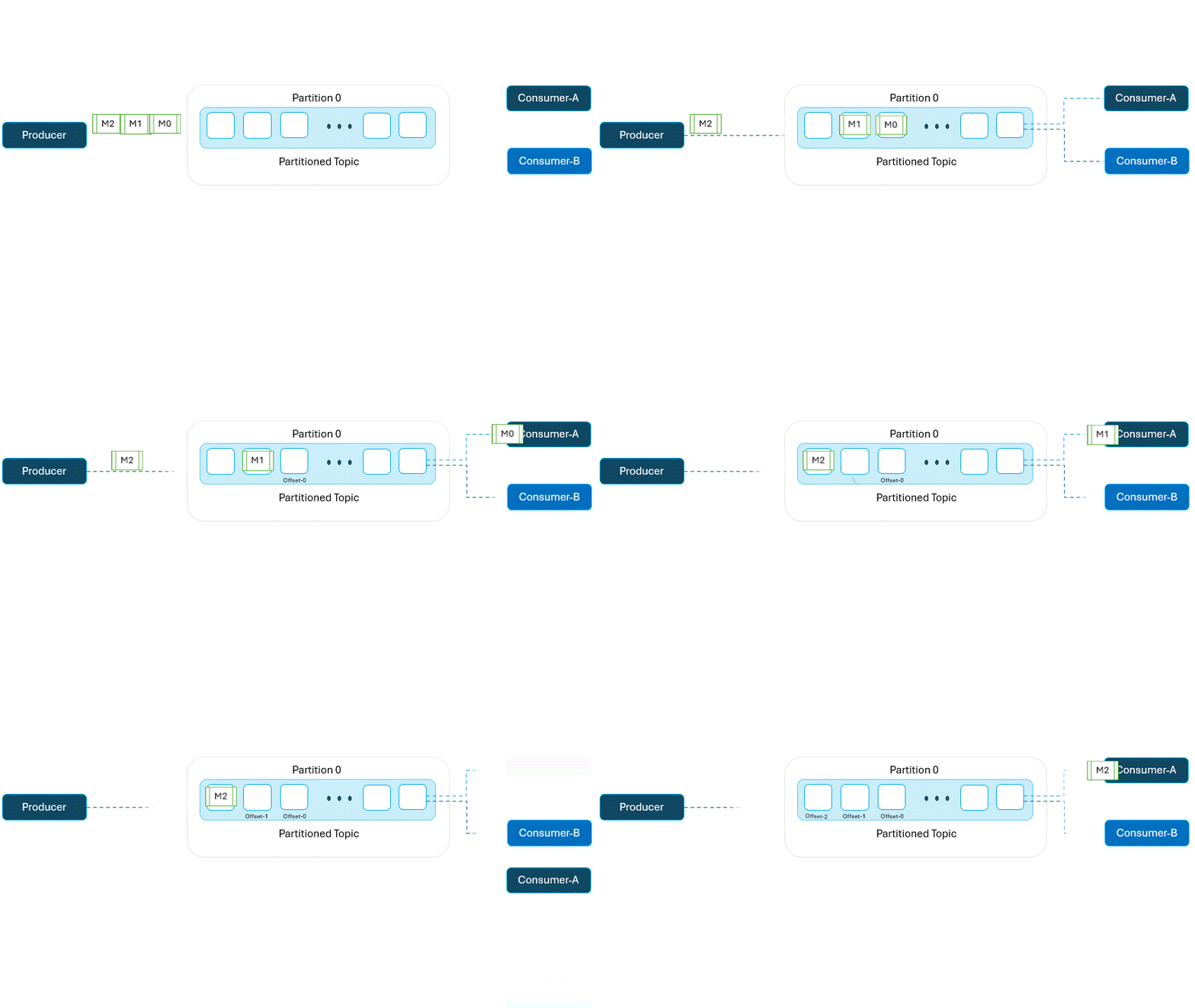
Example 2 — manual commits, when “at least once” isn’t good enough
Auto-commit has a real gap: Kafka commits on a timer, not when your processing actually finishes. If your consumer crashes after Kafka auto-commits but before your code finishes handling the message, that message is gone for good as far as the consumer group is concerned.
For anything where losing a message is worse than reprocessing one — payment events, inventory updates, anything downstream systems can’t easily reconcile — commit manually, after processing succeeds:
- Consumer-B reads a message at offset 0. It does not commit yet.
- It processes the message. If it crashes here, nothing was committed — on restart, it re-reads offset 0 from scratch.
- Once processing finishes successfully, then it commits offset 0.
This trades a bit of throughput for a real guarantee: a message is only ever marked “done” after your code has actually finished with it.
4. Replay and rewind
Because Kafka retains messages for a configured retention window rather than deleting them the moment they’re read, you’re not locked into “latest” as your only starting point. You can point a consumer at a specific offset — say, offset 100 — and it will start there, re-reading everything after it.
That’s the mechanism behind two very ordinary production tasks:
- Backfilling. A downstream table was wrong for three days because of a bug — fix the bug, rewind the consumer to before the bad deploy, and let it reprocess.
- Debugging. Something went wrong in production and you want to see exactly what the consumer saw, in order, without touching the live topic.
5. Tracking offsets yourself, in Python
Here’s a minimal consumer using kafka-python that logs the offset of every message it processes and commits manually, so you can see the mechanics from example 2 in actual code:
from kafka import KafkaConsumer
import logging

logging.basicConfig(level=logging.INFO, format="%(asctime)s - %(message)s")

def consume_messages(broker, topic):
    consumer = KafkaConsumer(
        topic,
        bootstrap_servers=[broker],
        group_id="example_group",
        auto_offset_reset="earliest",   # start from the beginning if there's no committed offset yet
        enable_auto_commit=False,       # we're committing manually
    )

    try:
        for message in consumer:
            print(f"Message: {message.value.decode('utf-8')}")
            print(f"Partition: {message.partition}, Offset: {message.offset}")

            logging.info(f"Processed message at offset {message.offset} in partition {message.partition}")

            # commit only after the message has actually been handled
            consumer.commit()
    except KeyboardInterrupt:
        print("Stopped consuming.")
    finally:
        consumer.close()

broker = "localhost:9092"
topic = "your_topic_name"
consume_messages(broker, topic)
A couple of things worth calling out:
auto_offset_reset="earliest"only matters the first time this consumer group reads the topic — once it has a committed offset, that’s what it resumes from, regardless of this setting. Set it to"latest"if you’d rather skip history on a brand-new consumer group.enable_auto_commit=Falseplus an explicitconsumer.commit()after processing is exactly the manual pattern from example 2. Delete both of those lines and Kafka reverts to its default periodic auto-commit.
Run this, kill it mid-stream, and restart it — you’ll see it pick up from the last logged offset instead of reprocessing everything or skipping ahead.
6. The follow-up question every SRE asks: how far behind am I?
Tracking your own offset only answers half the question. The other half is consumer lag — the gap between the offset your consumer has committed and the latest offset actually written to the partition. A consumer can be alive, healthy, and still falling further behind every minute if it can’t keep up with the incoming rate, and offset logging alone won’t tell you that.
The quickest way to check lag from the command line:
kafka-consumer-groups.sh --bootstrap-server localhost:9092 \
  --describe --group example_group
The LAG column in that output is the number to alert on. A consumer group with steadily growing lag is a slow-motion incident — it’s usually easier to catch from a dashboard than from a support ticket three hours later.
Wrapping up
Offsets aren’t a Kafka quirk to memorize — they’re the entire mechanism that makes Kafka consumers resumable, replayable, and debuggable. Once you know the difference between a message offset and a consumer offset, and when to trade auto-commit’s simplicity for manual commit’s guarantees, the rest of Kafka’s consumer behavior mostly falls out of that one idea.